
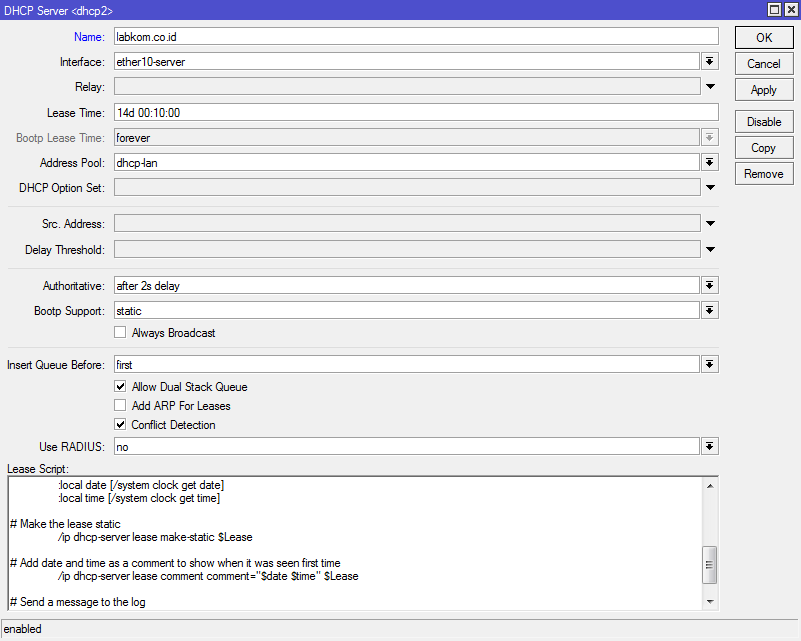
Script ini akan bekerja ketika ada device yang pertama terhubung ke DHCP Server mikrotik dan otomatis membuat device tersebut menjadi static (Make Static).
Script ini dipasang di IP --> DHCP Server --> DHCP --> Nama DHCP Server
Share to Unlock Content
Silahkan share untuk membuka link download dan membuka scriptnya
Apabila tutorial ini bermanfaat support saya dengan cara share artikel ini..
Terimakasih
# Created Jotne 2019 v1.2
#
# This scripts stats all DHCP release to static automaticalle
# It should run on all routerOS version


# Test if this is a Bound session and the lease is a dynamic one. Do not change older reservation
:if (($leaseBound=1) && ([/ip dhcp-server lease find where dynamic mac-address=$leaseActMAC]!="")) do {

# Get the lease number
	:local Lease [/ip dhcp-server lease find mac-address=$leaseActMAC]

# Get date and time
	:local date [/system clock get date]
	:local time [/system clock get time]

# Make the lease static
	/ip dhcp-server lease make-static $Lease

# Add date and time as a comment to show when it was seen first time
	/ip dhcp-server lease comment comment="$date $time" $Lease

# Send a message to the log
	:log info message="script=dhcp_static server=$leaseServerName IP=$leaseActIP MAC=$leaseActMAC"
}
Untuk membuat Static pada DHCP Lease yang aktif jalankan script ini di New Terminal.
[
:local date [/system clock get date]
:local time [/system clock get time]
:foreach lease in=[/ip dhcp-server lease find dynamic] do={
	/ip dhcp-server lease make-static $lease
	/ip dhcp-server lease comment comment="$date $time" $lease
}
]
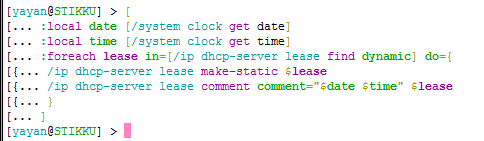
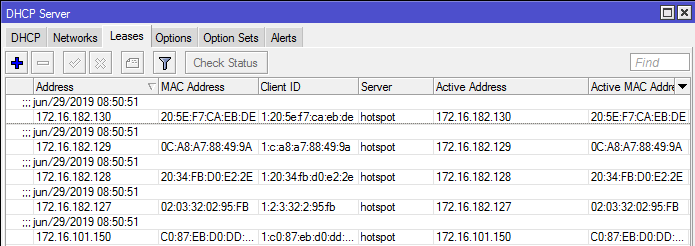
Ketika script ini di jalankan di New Terminal semua client yang ada di DHCP Lease akan berubah menjadi static
Baca juga:
- Apa Itu Serangan DHCP Starvation dan Serangan DHCP Spoofing?
- Monitoring Client DHCP Lease dengan Netwatch dan Bot Telegram
- Membuat Simple Queue Otomatis Dari DHCP Server Leases
- Merubah DHCP Lease Menjadi Static (Make Static Otomatis) dengan Script Mikrotik
- Monitoring DHCP Server Mikrotik Menggunakan Bot Telegram
- Notifikasi e-mail Perangkat yang Terhubung Melalui DHCP Server Mikrotik Menggunakan Script
Sumber : Forum Mikrotik