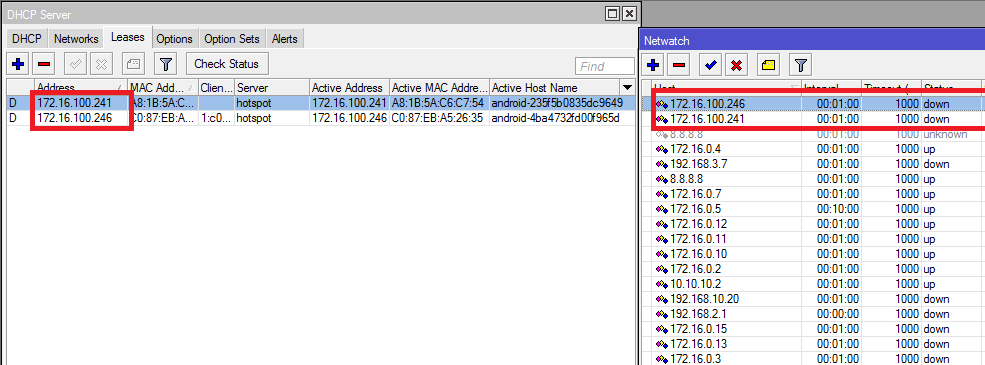
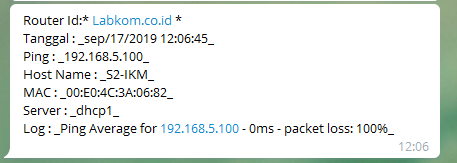
Script ini akan otomatis memonitoring client yang terhubung ke DHCP Server Lease kemudian IP/Host Client tersebut akan dimasukkan kedalam Tool –> Netwatch , apabila host tersebut Up atau Down maka akan mengirimkan informasi ke Bot Telegram. Netwatch akan dihapus ketika IP/Host yang dimonitorng terhapus di DHCP Lease .
Script di DHCP Server
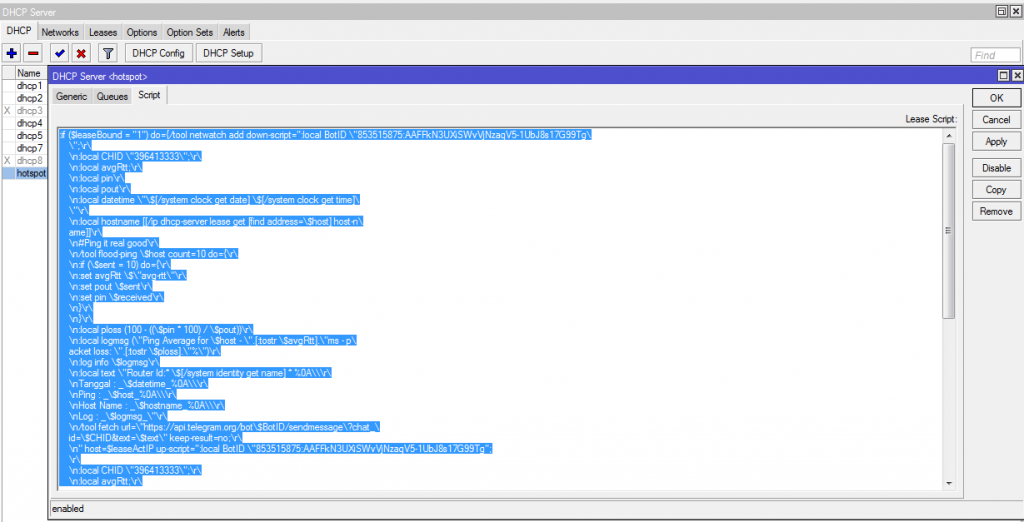
Simpan Script ini di DHCP Server lalu pilih DHCP Server yang akan di Monitoring
Share to Unlock Content
image/svg+xml Silahkan share untuk membuka link download dan membuka scriptnya
Apabila tutorial ini bermanfaat support saya dengan cara share artikel ini..
Terimakasih
:if ($leaseBound = "1") do={/tool netwatch add down-script=":local BotID \"853515875:AAFFkN3UXiSWvVjNzaqV5-XXXXXXXXX\
    \";\r\
    \n:local CHID \"39641XXX\";\r\
    \n:local avgRtt;\r\
    \n:local pin\r\
    \n:local pout\r\
    \n:local datetime \"\$[/system clock get date] \$[/system clock get time]\
    \"\r\
    \n:local hostname [[/ip dhcp-server lease get [find address=\$host] host-n\
    ame]]\r\
    \n#Ping it real good\r\
    \n/tool flood-ping \$host count=10 do={\r\
    \n:if (\$sent = 10) do={\r\
    \n:set avgRtt \$\"avg-rtt\"\r\
    \n:set pout \$sent\r\
    \n:set pin \$received\r\
    \n}\r\
    \n}\r\
    \n:local ploss (100 - ((\$pin * 100) / \$pout))\r\
    \n:local logmsg (\"Ping Average for \$host - \".[:tostr \$avgRtt].\"ms - p\
    acket loss: \".[:tostr \$ploss].\"%\")\r\
    \n:log info \$logmsg\r\
    \n:local text \"Router Id:* \$[/system identity get name] * %0A\\\r\
    \nTanggal : _\$datetime_%0A\\\r\
    \nPing : _\$host_%0A\\\r\
    \nHost Name : _\$hostname_%0A\\\r\
    \nLog : _\$logmsg_\"\r\
    \n/tool fetch url=\"https://api.telegram.org/bot\$BotID/sendmessage\?chat_\
    id=\$CHID&text=\$text\" keep-result=no;\r\
    \n" host=$leaseActIP up-script=":local BotID \"853515875:AAFFkN3UXiSWvVjNzaqV5-XXXXXXXXXX\
    \";\r\
    \n:local CHID \"39641XXX\";\r\
    \n:local avgRtt;\r\
    \n:local pin\r\
    \n:local pout\r\
    \n:local datetime \"\$[/system clock get date] \$[/system clock get time]\
    \"\r\
    \n:local hostname [[/ip dhcp-server lease get [find address=\$host] host-n\
    ame]]\r\
    \n#Ping it real good\r\
    \n/tool flood-ping \$host count=10 do={\r\
    \n:if (\$sent = 10) do={\r\
    \n:set avgRtt \$\"avg-rtt\"\r\
    \n:set pout \$sent\r\
    \n:set pin \$received\r\
    \n}\r\
    \n}\r\
    \n:local ploss (100 - ((\$pin * 100) / \$pout))\r\
    \n:local logmsg (\"Ping Average for \$host - \".[:tostr \$avgRtt].\"ms - p\
    acket loss: \".[:tostr \$ploss].\"%\")\r\
    \n:log info \$logmsg\r\
    \n:local text \"Router Id:* \$[/system identity get name] * %0A\\\r\
    \nTanggal : _\$datetime_%0A\\\r\
    \nPing : _\$host_%0A\\\r\
    \nHost Name : _\$hostname_%0A\\\r\
    \nLog : _\$logmsg_\"\r\
    \n/tool fetch url=\"https://api.telegram.org/bot\$BotID/sendmessage\?chat_\
    id=\$CHID&text=\$text\" keep-result=no;\r\
    \n"
} else={
/tool netwatch remove [find host=$leaseActIP]
}
Script ini akan membuat Netwatch baru apabila di DHCP Server Lease terdapat IP/Host baru yang terhubung ke DHCP Server
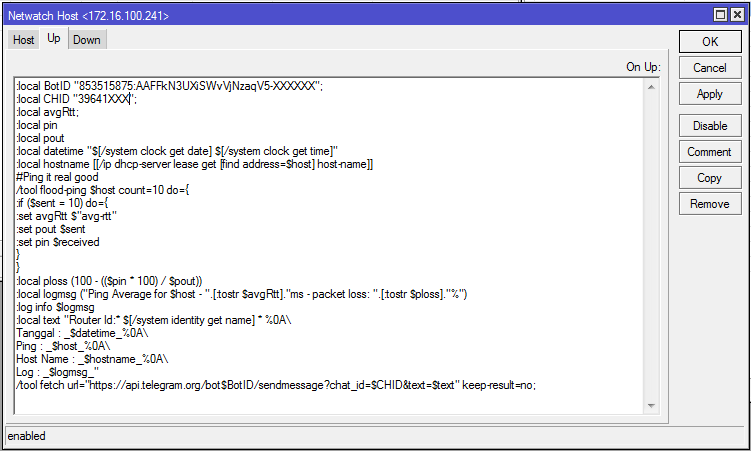
Dan menambahkan Script di UP dan Down, untuk perintah monitoring ke Bot Telegram
Share to Unlock Content
image/svg+xml Silahkan share untuk membuka link download dan membuka scriptnya
Apabila tutorial ini bermanfaat support saya dengan cara share artikel ini..
Terimakasih
:local BotID "853515875:AAFFkN3UXiSWvVjNzaqV5-XXXXXXXXXXXX";
:local CHID "39641XXXXX";
:local avgRtt;
:local pin
:local pout
:local datetime "$[/system clock get date] $[/system clock get time]"
:local hostname [[/ip dhcp-server lease get [find address=$host] host-name]]
#Ping it real good
/tool flood-ping $host count=10 do={
:if ($sent = 10) do={
:set avgRtt $"avg-rtt"
:set pout $sent
:set pin $received
}
}
:local ploss (100 - (($pin * 100) / $pout))
:local logmsg ("Ping Average for $host - ".[:tostr $avgRtt]."ms - packet loss: ".[:tostr $ploss]."%")
:log info $logmsg
:local text "Router Id:* $[/system identity get name] * %0A\
Tanggal : _$datetime_%0A\
Ping : _$host_%0A\
Host Name : _$hostname_%0A\
Log : _$logmsg_"
/tool fetch url="https://api.telegram.org/bot$BotID/sendmessage?chat_id=$CHID&text=$text" keep-result=no;
Script: https://pastebin.com/F5f4D0xg
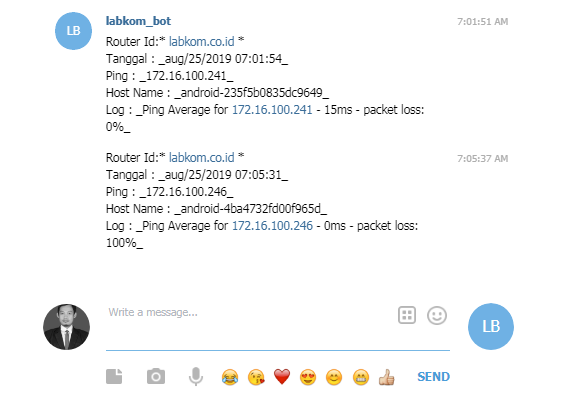
Hasilnya IP yang terhubung ke DHCP Server akan di Monitoring
Update: Menambahkan MAC Address dan Nama Server
Baca juga:
VIDEO